
Getting Started with EVV
The Articles below show how EVV works within SETWorks and how to configure your system so the EVV data is captured and submitted successfully.
Monthly Support Webinar - February 2022 - Mobile and EVV
This 1 hour webinar reviews EVV in SETWorks from start to finish.
Electronic Visit Verification (EVV) - The Basics
This article includes videos of how to use the EVV Experience from an end-users perspective. Learn how to create a new record from scratch and convert an existing appointment.
Electronic Visit Verification (EVV) Services
This article reviews all of the necessary configuration and setup for SETWorks administrators to start using EVV, starting with service configuration.
Electronic Visit Verification (EVV) - QA Process
This article reviews how managers and administrators can view and adjust GPS data recorded by the SETWorks EVV Experience.
Telephone Visit Verification (TVV)
This article reviews how to use the SETWorks TVV features, in instances where staff don't have access to smartphones and cellular data.
This article reviews how to use the Manage Batches and Submit Billing feature to submit EVV data to the state-selected aggregator.
Configuration Notes
There are several privileges and settings that need to be enabled in order for EVV to work properly. Please review the Electronic Visit Verification (EVV) Services article for a full description of all settings. The most important things to enable are:
1. Enable the EVV Experience so that users can access the SETWorks EVV Experience.
2. Enable Check-In and Check-Out for all roles that will be using the EVV Experience.
3. Ensure any services that require EVV are set as "EVV Services".
4. Review access to the Manage Batches and Submit Billing page, which is where SETWorks administrators will submit EVV data to Sandata.
5. Ensure the Place of Service field is enabled and that the Place of Service Utility is updated with the applicable codes to indicate Place of Service. (The Place of Service code in the Utility must use code 12 for all In-Home services. All other codes are submitted as Community.) See Place of Service article.
6. Primary Location is required and is a dropdown on the activity record. The Primary Location will auto-populate the primary address of the first consumer added on the activity record.
Note: Enable the Primary Location drop-down on the Billable Group Activity Record as well as the Locations tab on the EVV Experience.
Required for CA Providers:
NOTE: In order for your SETWorks system integration to be successful, include the following:
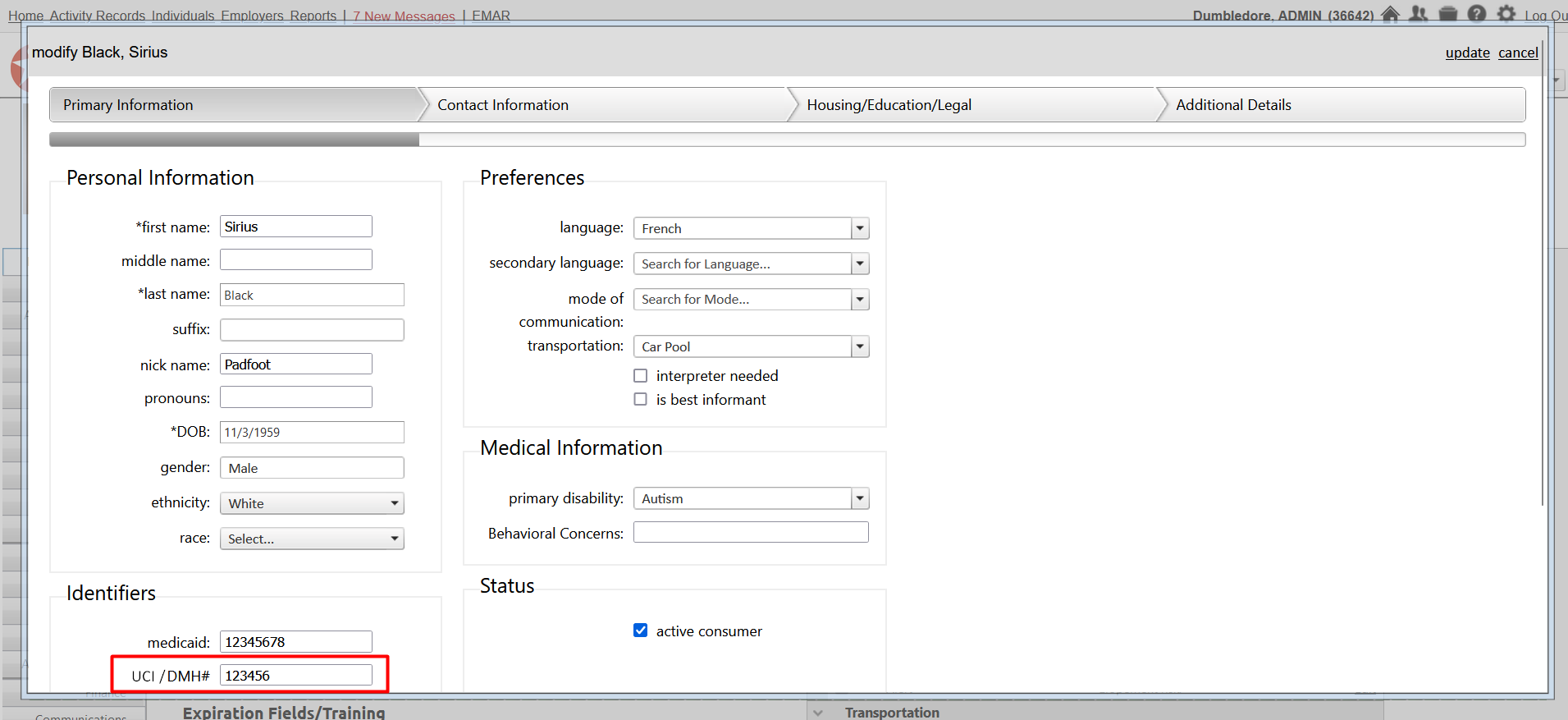
1. UCI number in the Consumer's Profile (7-digits). If applicable, a secondary identifier is to be inserted into the Medicaid field.
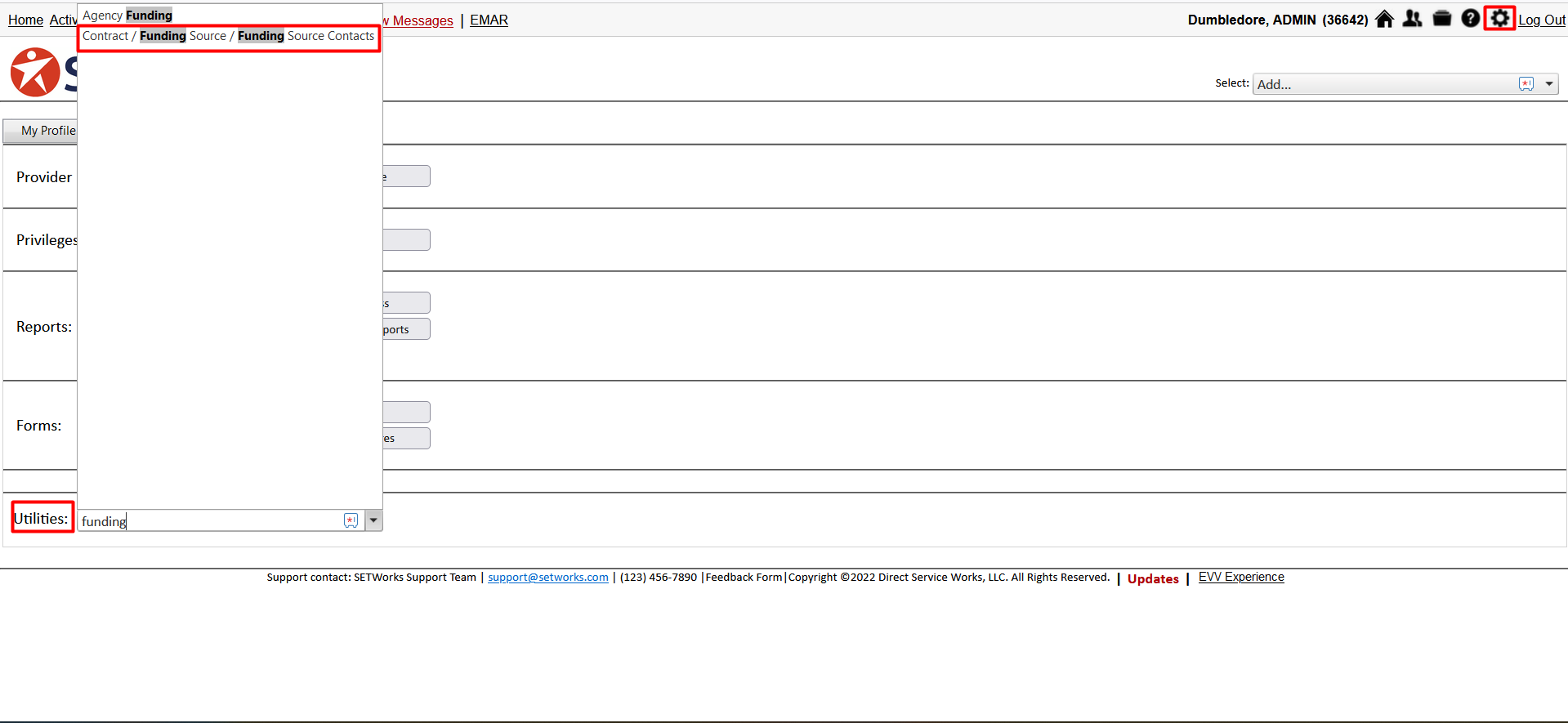
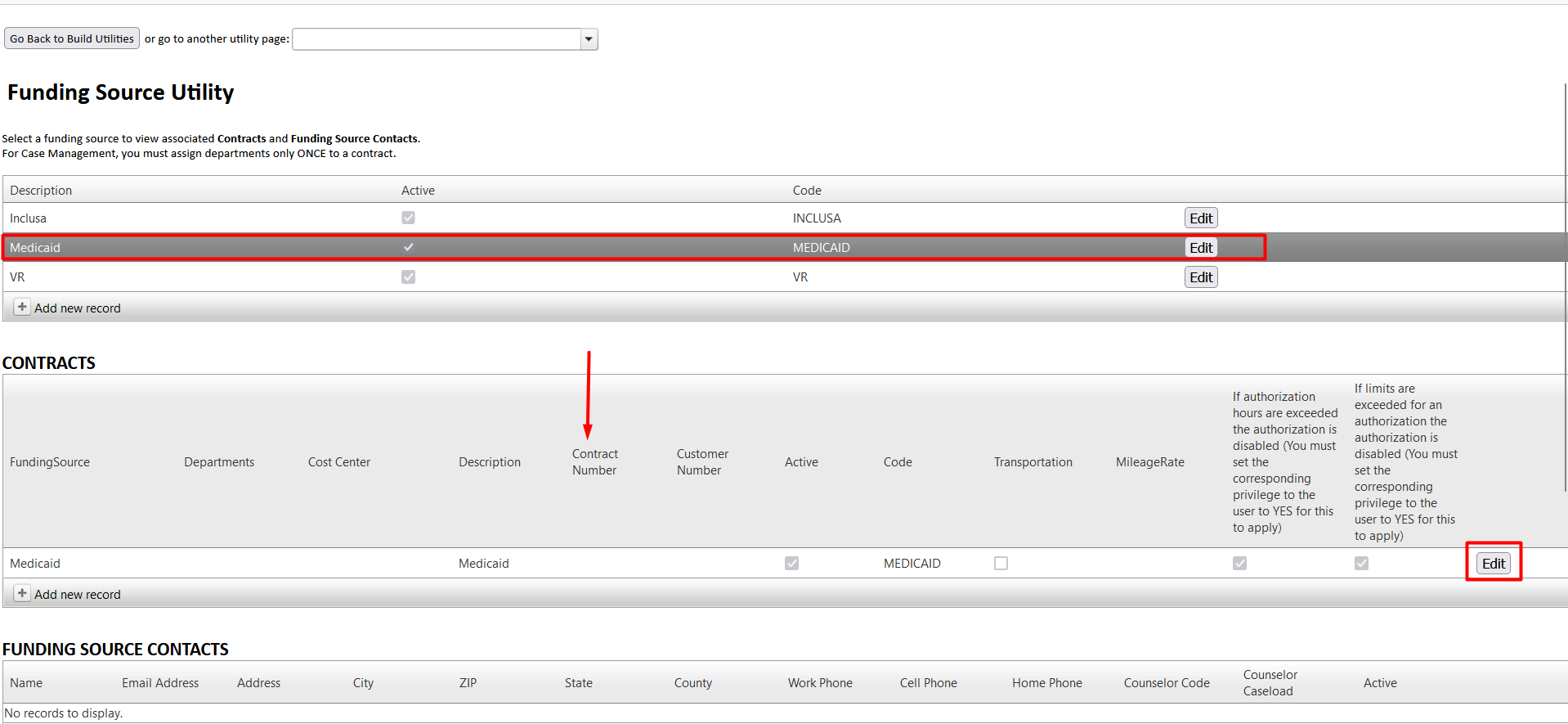
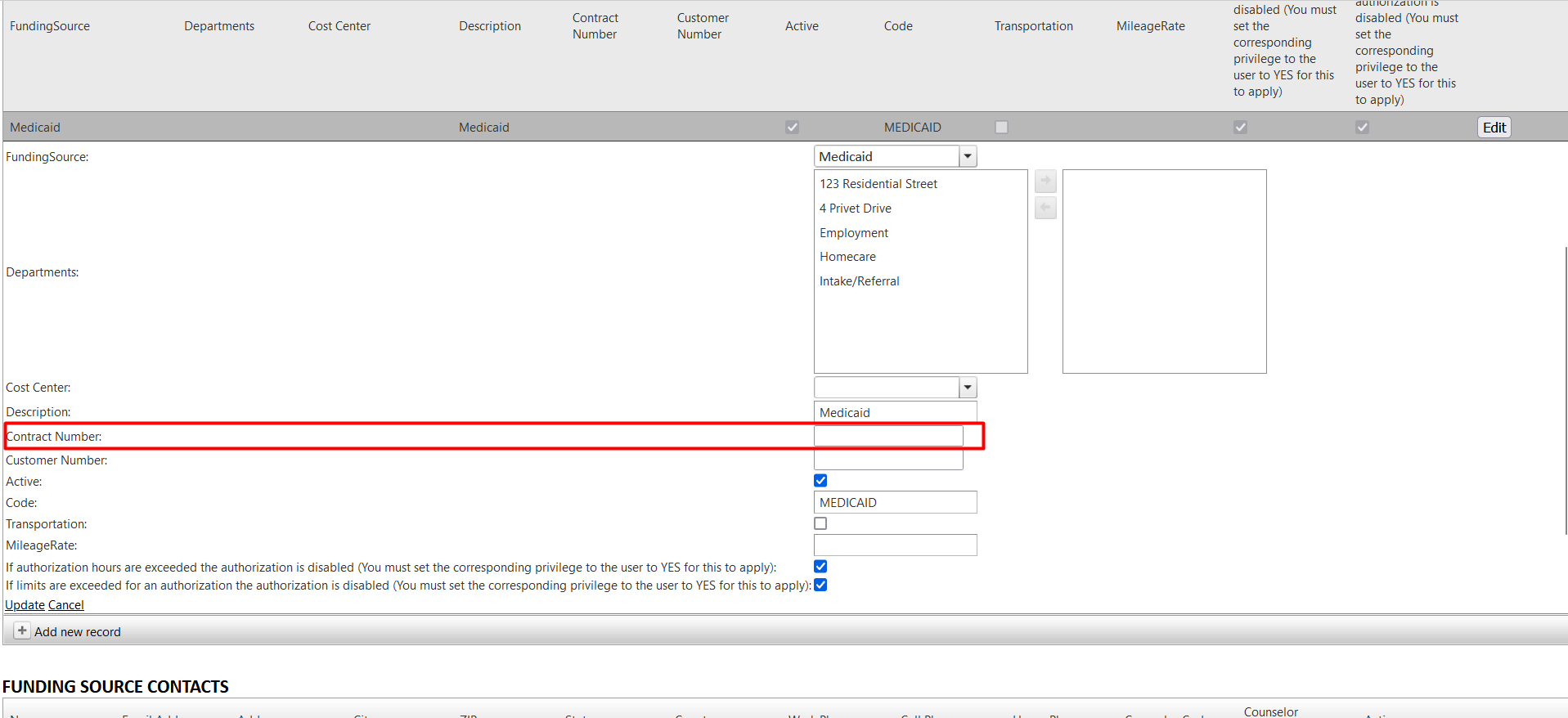
2. Jurisdiction ID processed in the Contract Number field within the Contract / Funding Source / Funding Source Contacts Utility (see options below - or - Appendix 4 of the AltEVV CA Specifications).
Appendix 4: Jurisdictional Entities (Alternative EVV Vendor Specifications v2.1)
Jurisdictional Entities ID: Jurisdictional Entities Description — State Department (Payer Code)
360: Frank D. Lanterman Regional Center — CADDS
361: Golden Gate Regional Center — CADDS
362: San Diego Regional Center — CADDS
363: Far Northern Regional Center — CADDS
364: Alta California Regional Center — CADDS
365: San Andreas Regional Center — CADDS
366: Tri-Counties Regional Center — CADDS
367: Central Valley Regional Center — CADDS
368: Regional Center of Orange County — CADDS
369: Inland Regional Center — CADDS
370: Redwood Coast Regional Center — CADDS
371: North Bay Regional Center — CADDS
372: Kern Regional Center — CADDS
373: Eastern Los Angeles Regional Center — CADDS
374: South Central Los Angeles Regional Center — CADDS
375: Harbor Regional Center — CADDS
376: Westside Regional Center — CADDS
377: Valley Mountain Regional Center — CADDS
378: North Los Angeles County Regional Center — CADDS
379: San Gabriel/Pomona Regional Center — CADDS
380: Regional Center of the East Bay — CADDS
IHSS07: Contra Costa County - IHSS — CAIHSS
IHSS38: San Francisco County - IHSS — CAIHSS
AHF: AIDS Healthcare Foundation — CAMCWP
AMHS: AltaMed Health Services Corp. — CAMCWP
APEB: AIDS Project of the East Bay — CAMCWP
APLA: APLA Health and Wellness — CAMCWP
ASF: AIDS Services Foundation — CAMCWP
ASN: Access Support Network — CAMCWP
CCC: County of Contra Costa — CAMCWP
CCMC: Community Care Management Corp. — CAMCWP
DAP: Desert AIDS Project — CAMCWP
HHCM: Home and Health Care Management — CAMCWP
HPC: Health Projects Center — CAMCWP
MAP: Minority AIDS Project — CAMCWP
PCAH: Primary Care at Home, Inc. — CAMCWP
RxS: Rx Staffing and Homecare, Inc — CAMCWP
SFAF: Sierra Foothills AIDS Foundation — CAMCWP
SMMC: St. Mary Medical Center — CAMCWP
TTC: Tarzana Treatment Centers — CAMCWP
VCPHD: Ventura County Public Health Department — CAMCWP
1: City Of Oakland — CAMSSP
4: Jewish Family Services Of Los Angeles — CAMSSP
5: Senior Care Action Network (SCAN) — CAMSSP
6: Institute On Aging — CAMSSP
7: San Diego County Aging And Independence Services — CAMSSP
8: Community Care Management Corporation — CAMSSP
9: Humboldt Senior Resource Center, Inc. — CAMSSP
10: California State University, Chico — CAMSSP
11: Sonoma County Area Agency On Aging — CAMSSP
14: Stanislaus County Department Of Aging And Veterans Services — CAMSSP
16: Huntington Hospital — CAMSSP
17: County Of San Bernardino — CAMSSP
20: Sourcewise — CAMSSP
21: Fresno-Madera Area Agency On Aging — CAMSSP
23: Imperial County Work Training Center — CAMSSP
24: County Of Riverside — CAMSSP
25: Dignity Health Connected Living — CAMSSP
26: Jewish Family Services Of Marin — CAMSSP
28: County Of Merced — CAMSSP
32: Area 12 Agency On Aging — CAMSSP
33: County Of Kings/Tulare — CAMSSP
34: County Of Ventura — CAMSSP
37: City Of Fremont — CAMSSP
39: Human Services Association — CAMSSP
40: Partners In Care Foundation-North — CAMSSP
41: Cal-Optima — CAMSSP
43: Partners In Care Foundation-South — CAMSSP
47: Choice In Aging — CAMSSP
48: Health Projects Center Santa Cruz — CAMSSP
49: Catholic Charities Of The Diocese Stockton — CAMSSP
51: Partners In Care Foundation-Kern — CAMSSP
52: Health Projects Center Monterey — CAMSSP
53: California Health Collaborative-Sacramento — CAMSSP
54: Partners In Care Foundation-Santa Barbara — CAMSSP
55: California Health Collaborative-Yuba — CAMSSP
56: Choice In Aging-Napa/Solano — CAMSSP
57: California Health Collaborative- El Dorado — CAMSSP
ACC: Access TLC — CAWPCS
CEI: Centers for Elders' Independence — CAWPCS
DHCS: Department of Health Care Services — CAWPCS
HHM: Home Health Care Management — CAWPCS
IOA: Institute on Aging — CAWPCS
LHH: Libertana Home Health — CAWPCS
PIC: Partners in Care — CAWPCS
SCO: Sonoma County Human Services Department — CAWPCS
SYH: San Ysidro Health — CAWPCS
VCO: Ventura County Agency on Aging — CAWPCS
Last Updated 11/24/2021
Note: Please Note - You must enter the ID, not the description, for the appropriate jurisdictional entity.
Note: To whom do I reach out to for support with EVV issues?
Contact SETWorks support at support@setworks.com
Contact Sandata CA support at caaltevv@sandata.com