
NJ DVRS Supported Employment Initial Placement Information Report
This form only works for DVRS Services
The Form has multiple sources of data: Form (predefined/query answers, manual entry), Data Extractor (Billable Individual Activity Records).
Note: Throughout this document, "Merge Report" is used to refer to the NJ DVRS Supported Employment Initial Placement Information Report output. "Form" is used to refer to form creation within SETWorks.
As a General Rule:
If the data on the form is correct and is not appearing on merge reports - this is an engineering problem. Please contact Support
If the data on the form matches the merge report but the content is wrong - this is a data entry problem. Please refer to the Form.
Below will show you where each section pulls its information from
Consumer Information

Consumer Name: Populates from the Consumer Name
VRC: Populates from the Funding Source Contact
Provider: Populates from your Provider Name
Date of Report: Manual Entry from Date Picker
Employment Information

Job Title: Populates from Job Title in Job Placement
Start Date: Populates from the Start Date in Job Placement
Full Time, Part Time, Per Diem: Manual Entry through Checkboxes on the Form.
Employer Name: Populates from the Employer in the Job Placement.
Address: Populates from the Employer Address in the Job Placement.
City, State, Zip: Populates from the Employer Address in the Job Placement.
Supervisor: Manual Entry in the Form
Supervisor Title: Manual Entry in the Form
Supervisor Contact Information: Manual Entry in the Form
Hours per Week: Populates from the Wage Weekly Hours in the Job Placement.
Days per Week: Manual Entry in the Form.
Hourly Rate: Populates from the Current Wage in the Job Placement.
Job Analysis
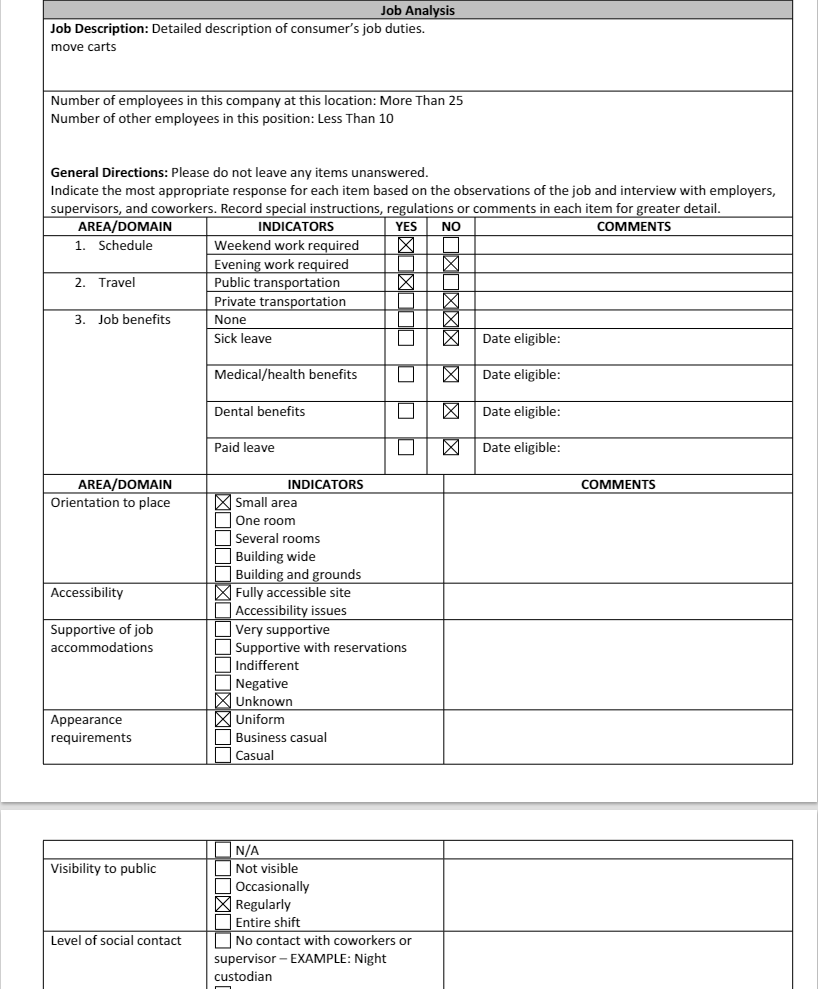
The Job Analysis section does not have any Predefined Answers or Data Extractors setup. This is all Manual Entry and will put whatever is entered from the Form into the Merge Report.
Placement Support Checklist
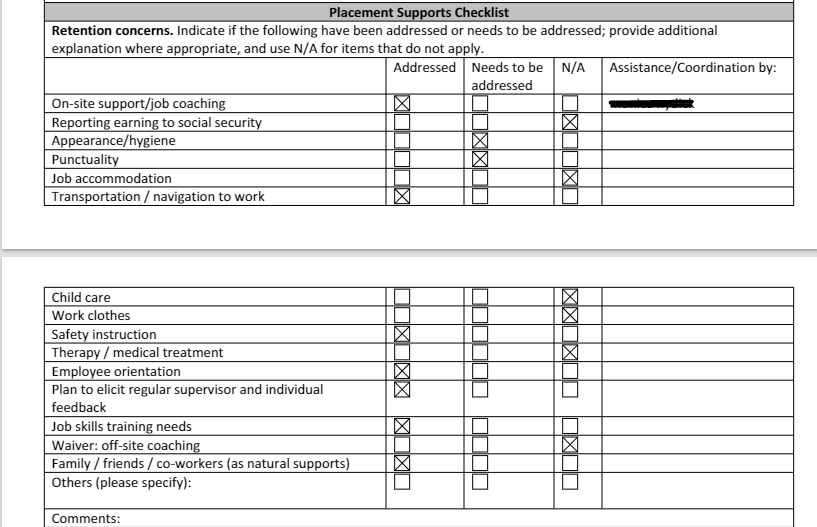
The Placement Support Checklist does not have any Predefined Answers or Data Extractors setup. This all Manual Entry and will put whatever is entered from the Form into the Merge Report.
Verification of Employment and/or Customized Employment

The Verification of Employment and/or Customized Employment does not have any Predefined Answers or Data Extractors setup. This all Manual Entry and will put whatever is entered from the Form into the Merge Report.
Anticipated Job Coaching Needs

The Anticipated Job Coaching Needs does not have any Predefined Answers or Data Extractors setup. This all Manual Entry and will put whatever is entered from the Form into the Merge Report.
Certification

Top Section: Populates the Name of the Person Filling out the Form
First and Last Name of Job Coach: Manual Entry in the Form
Title: Manual Entry in the Form
Signature: Populates from the Signature from the Form Grid