
My Funder Allows for Staff to Bill Individualized Rates - How Do I Use the Variable Rates Feature in SETWorks?
Administrators
SETWorks has the ability to bill the same service at different rates based upon staff experience and training.
Using Variable Rates
To enter a variable rate, navigate to the appropriate service in the Service/Phase utility and then select "Variable Rate":
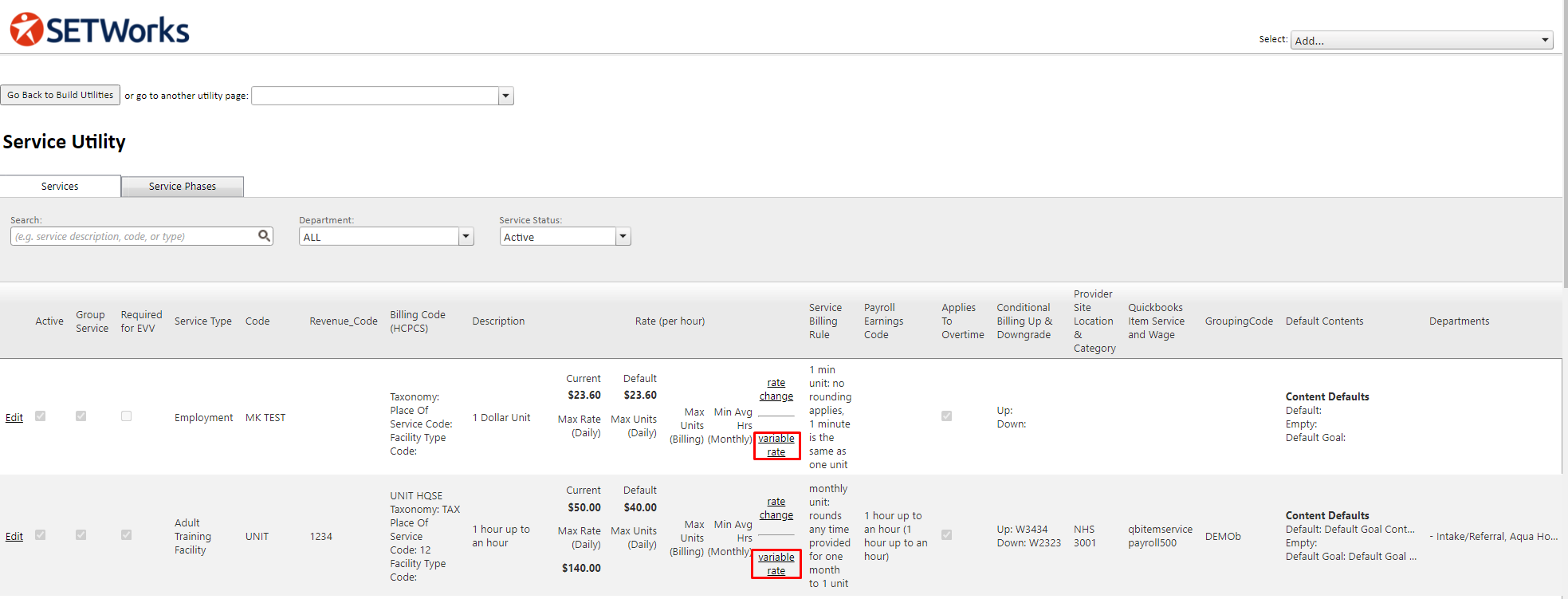
In the window that opens, select "add variable rate":

Select the position for the variable rate and select a start date and type in the rate. Then click Insert.
Insert as many variable rates as you need and then confirm the rates were saved:

Examples and Workflows
The following is an example workflow that highlights how variable rates can be used.
Let's say that the provider is authorized for one service. For that particular service they are authorized to provide 10 hours per week.
The rate for which they can bill differs depending on the staff providing the service.
If staff A, who has a bachelor's degree, works with the client the rate is $80 per hour.
If staff B, who has a master's degree, works with the same client the rate is $100 per hour.
This allows for Staff A to bill 4 hours at $80 an hour and Staff B to bill 6 hours at $100 an hour, which exhausts the available 10 hours.
If variable rates weren't available, it would be difficult to track the two different rates as a single service and would risk going over the allotted 10 hours. With variable rates, the service is tracked under the same single service so it's much easier to track how many hours have been provided without exceeding the authorization.