
EVV in Missouri is set to go live in November 2021. The Articles below show how EVV works within SETWorks and how to configure your system so the EVV data is captured and submitted successfully.
Note: If you are not submitting EVV data in Missouri successfully, please contact support@setworks.com
to get additional support with configuration.Monthly Support Webinar - February 2022 - Mobile and EVV
This 1 hour webinar reviews EVV in SETWorks from start to finish.
Electronic Visit Verification (EVV) - The Basics
Electronic Visit Verification (EVV) Services
Missouri Services - Medicaid Procedure Codes
Missouri EVV - FCSR and Medicaid ID
Electronic Visit Verification (EVV) - QA Process
Telephone Visit Verification (TVV)
About the Submission Process:
About configuring Services:
Missouri EVV - Service and Service Codes
As needed depending on service and funder:
Configuration Notes
There are several privileges and settings that need to be enabled in order for EVV to work properly. Please review the Electronic Visit Verification (EVV) Services article for a full description of all settings. The most important things to enable are:
1. Enable the EVV Experience so that users can access the SETWorks EVV Experience.
2. Enable Check-In and Check-Out for all roles that will be using the EVV Experience.
3. Enable Primary Location on the Billable Group Record.
4. Ensure any services that require EVV are set as "EVV Services".
5. Review access to the Manage Batches and Submit Billing page, which is where SETWorks administrators will submit EVV data to Sandata.
6. Ensure that the following three Identifiers are configured for Clients, Staff, and the Provider Profile:
NOTE: There are three DMH numbers that need to be in your SETWorks system for the integration to be successful.
1. Staff Family Care Safety Registry (FCSR) ID in the Staff Profile in Staff Management (8-digit FCSR ID).
2. Consumer's Medicaid number in the Consumer's Profile. (8-digit Departmental Client Number (DCN)).
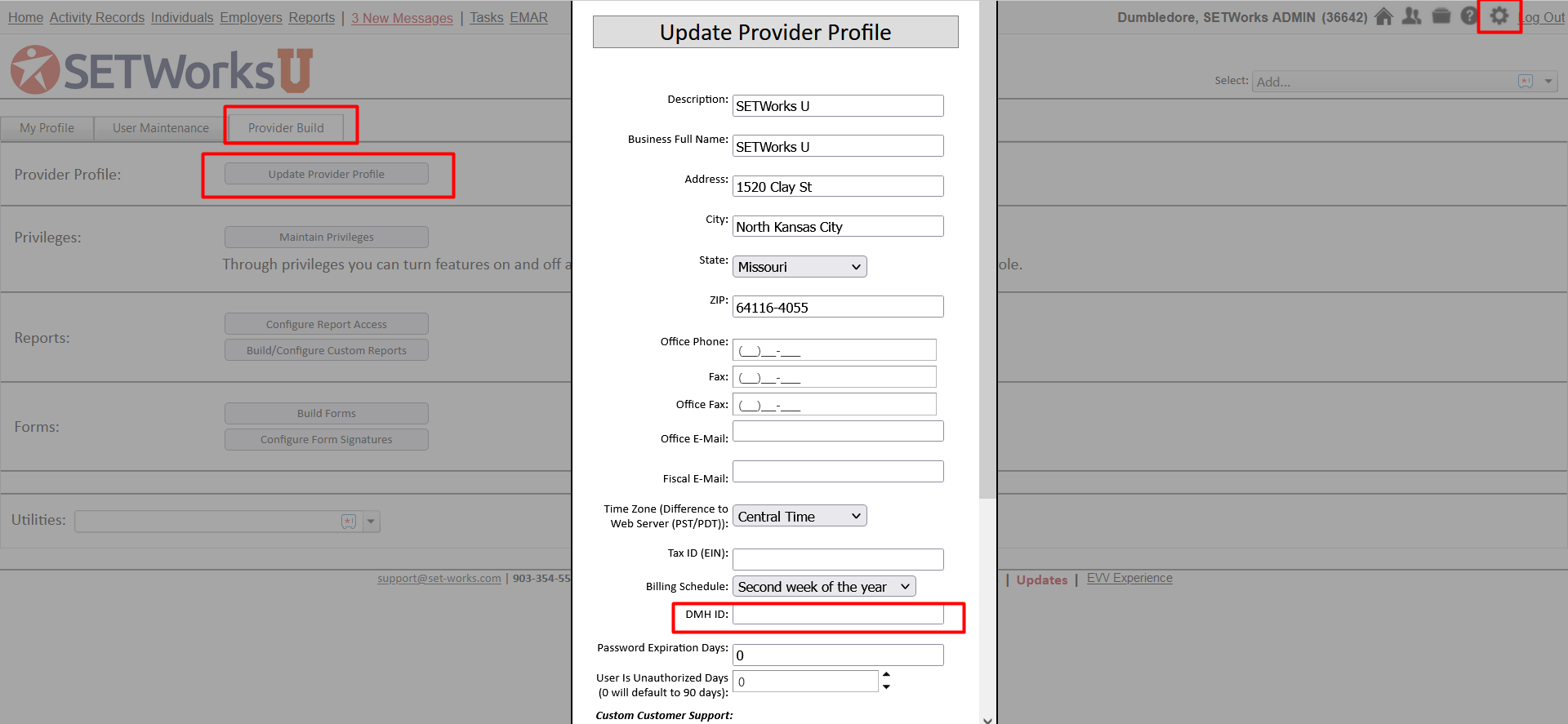
3. Provider's DMH ID in the Provider Profile. (9-Digits Medicaid ID).
Note: In order to submit your EVV data to Sandata, the provider's DMH ID must be entered in SETWorks. This can be entered be navigating to Settings > Provider Build > Provider Profile. This must be completed prior to the first data submission.
Note: To Contact Sandata: Email: moaltevv@sandata.com
Phone: 855-350-5844
Note: To register with MO DMH for EVV:
External Link