OOD Form 14 - Vocational Training Stipend
Form 14 works specially for: Vocational Training Stipend
This is the OOD Provider Form titled Form14 - Vocational Training Stipend
Form 14 has two major data sources: Form and Consumer At Work Activity Records
Note: NOTE: Throughout this document, "Merge Report" is used to refer to the Form output. "Form" is used to refer to form creation within SETWorks.
As a General Rule:
If the data on the form is correct and is not appearing on merge reports - this is an engineering problem. Submit a Jira.
If the data on the form matches the merge report but the content is wrong - this is a data entry problem. Refer to the form.
Nuances about Form 14
Regardless of the dates selected when building the form, this form looks at the whole authorization duration rather than the form duration.
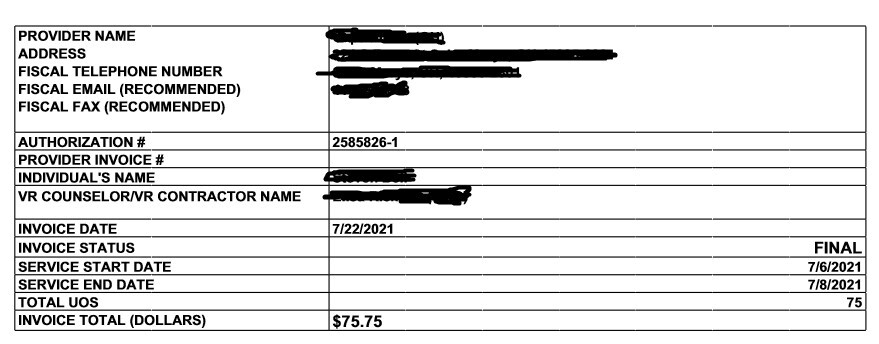
Merge Report: First Grid/Table
Most data appears as predefined query answers on the form from various parts of the site.
Top Row: Generated from Settings > Provider Build > Provider Profile.
VR Counselor/VR Contractor Name: Predefined/Query answer on the form - Funding Source Contact
Invoice Date: Date picker on the form; Blank entry results in current date populating on the merge report
Service Start Date: Generates from the earliest date range of the Activity Records that fall within that form date range.
Service End Date: Generates from the latest date range of the Activity Records that fall within that form date range.
Total UOS: Automatically calculates on the excel sheet
Invoice Total (Dollars): Calculated within the data extractor based on the number of units, which is also calculated within the data extractor.
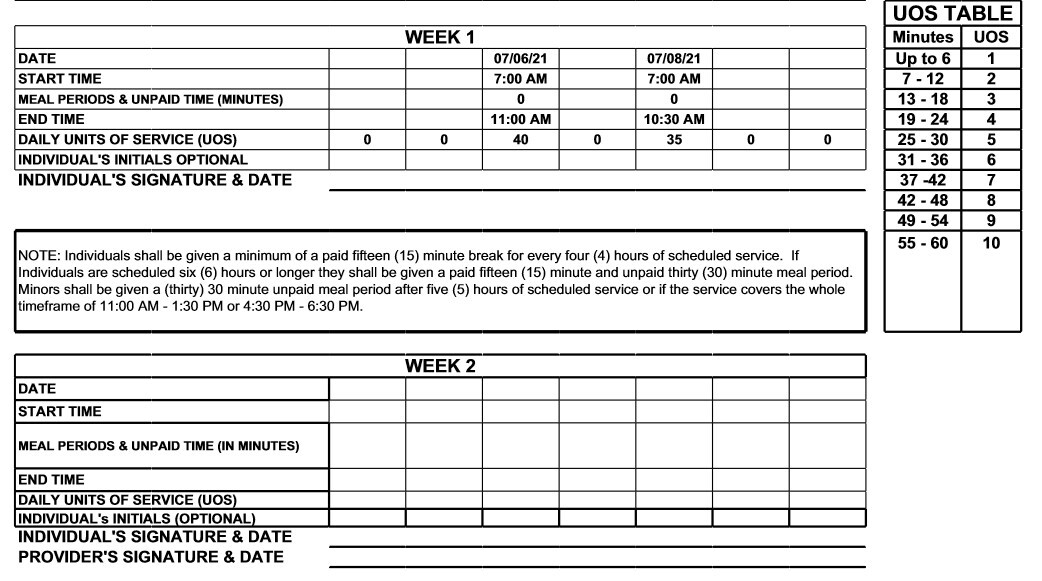
Merge Report: Week 1-5
Data is coming from all Activity Record types including Non-Billables, Billable Individual, and Billable Group
Meal Periods and Unpaid Time (Minutes): Populates from Non-Billable Activity Records; Needs to have Non-Billable Reason code of UNPAID_MEAL

Daily Units of Service (UOS): Calculated within the data extractor based on the service.
Individual's Signature & Date: Form signature based on the order of the form signatures. First signature = Week 1, second signature = Week 2
Provider Signature & Date: The third and seventh form signatures populate into the Provider Signatures.
NOTE: If a Provider Signature is needed but no data is on Week 2 or Week 5, insert a signature placeholder on the form to get to the third and seven signatures to correctly populate on the merge report.