OOD Form 14 - Vocational Training Stipend
Form 14 works specially for: Vocational Training Stipend
This is the OOD Provider Form titled Form14 - Vocational Training Stipend
Form 14 has two major data sources: Form and Activity Records
Note: NOTE: Throughout this document, "Merge Report" is used to refer to the Form 4 output. "Form" is used to refer to form creation within SETWorks.
As a General Rule:
If the data on the form is correct and is not appearing on merge reports - this is an engineering problem. Submit a Jira.
If the data on the form matches the merge report but the content is wrong - this is a data entry problem. Refer to the form.
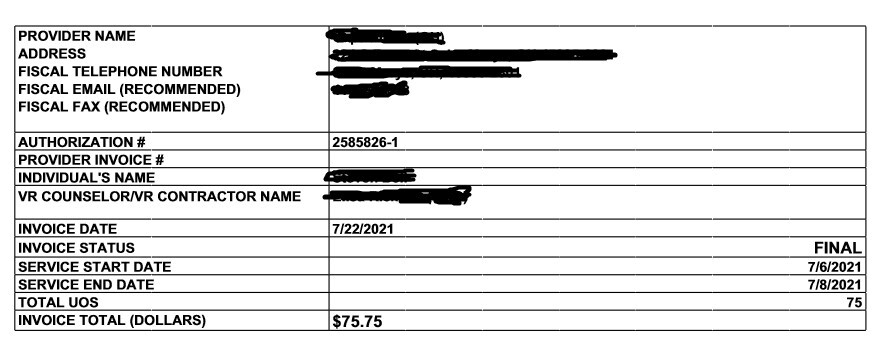
Merge Report: First Grid/Table
Most data appears as predefined query answers on the form from various parts of the site.
Top Row: Generated from Settings > Provider Build > Provider Profile.
VR Counselor/VR Contractor Name: Predefined/Query answer on the form - Funding Source Contact
Invoice Date: Date picker on the form; Blank entry results in current date populating on the merge report
Service Start Date: Generates from the earliest date range of the Activity Records that fall within that form date range.
Service End Date: Generates from the latest date range of the Activity Records that fall within that form date range.
Total UOS: Automatically calculates on the excel sheet
Invoice Total (Dollars): Calculated within the data extractor based on the number of units, which is also calculated within the data extractor.
Merge Report: Week 1-5
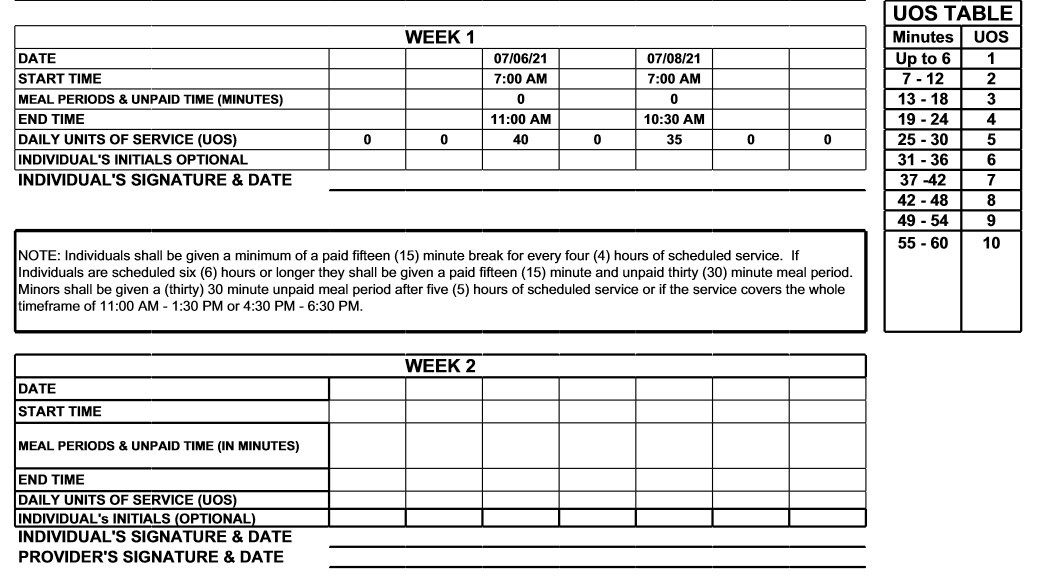
Data is coming from all Activity Record types including Non-Billables, Billable Individual, and Billable Group
Meal Periods and Unpaid Time (Minutes): Populates from Non-Billable Activity Records; Needs to have Non-Billable Reason code of UNPAID_MEAL

Daily Units of Service (UOS): Calculated within the data extractor based on the service.
Individual's Signature & Date: Form signature based on the order of the form signatures. First signature = Week 1, second signature = Week 2
Provider Signature & Date: The third and seventh form signatures populate into the Provider Signatures.
NOTE: If a Provider Signature is needed but no data is on Week 2 or Week 5, insert a signature placeholder on the form to get to the third and seven signatures to correctly populate on the merge report.