OOD Form 04 - JD, Tier I, Tier II (PBJD, SEJD), Tier III, SD, SC - Monthly Summary
Form 4 only works for the following services: Job Development, Tier 1, Tier II (Performance Based Job Development, Supported Employment Job Development), Tier III, Site Development, and Site Coordination.
This is the OOD Provider Form titled Form 04 - Monthly Placement
Form 4 can be thought to have two sources of data: Form creation and Activity Records.
Note: Everything in Red
font are automatic calculations on the excel sheet. NOTE: Throughout this document, "Merge Report" is used to refer to the Form 4 output. "Form" is used to refer to form creation within SETWorks.
As a General Rule:
If the data on the form is correct and is not appearing on merge reports - this is an engineering problem. Submit a Jira.
If the data on the form matches the merge report but the content is wrong - this is a data entry problem. Refer to the form.
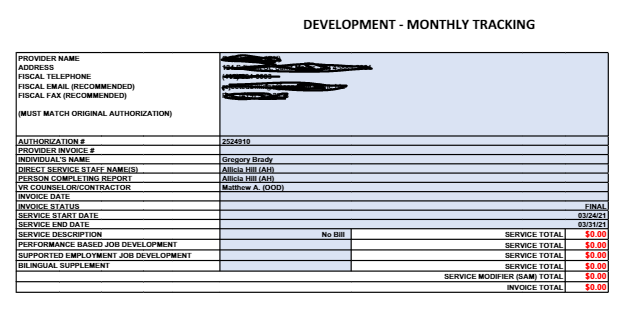
Merge Report: Page 1
Most data appears as predefined query answers on the form from various parts of the site.
Top Row: Generated from Settings > Provider Build > Provider Profile.
"Service Description": "No Bill" only appears when the AuthLine does not have a completed date.
Calculations: automatically calculates on the excel sheet.
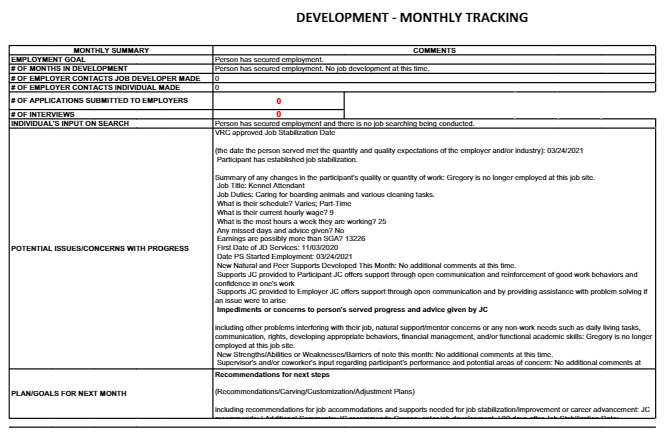
Merge Report: Page 2
All of this data comes from the form as predefined query answers or manual input.
# of Applications: automatically calculates on the excel sheet.
# of Interviews: automatically calculates on the excel sheet.
Troubleshooting: Refer to the SETWorks form.
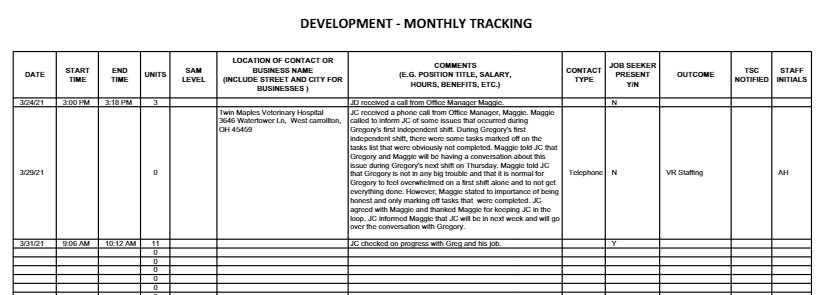
Merge Report: Page 3
All of this data comes from the Activity Records considering Authorization and date range.
NOTE: Formatting is Activity Record row and then all Communication rows underneath per Activity Record.
e.g., 3/24/21 below is the Activity Record. 3/29/21 is the Communication Record within that 3/24/21 Activity Record.
Units: automatically calculates on the excel sheet.
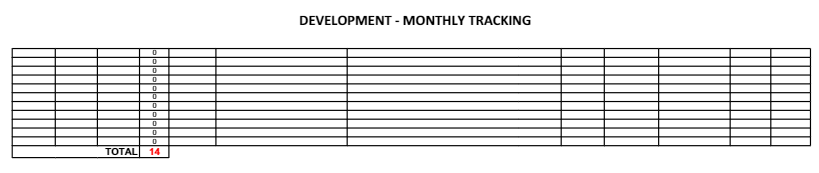
Total: automatically calculates on the excel sheet.
Troubleshooting: Refer to the Activity Record according to the "date" column and "start time" column. Refer to Communications on that Activity Record - must be associated with the AR.